Case Study
BillFlow
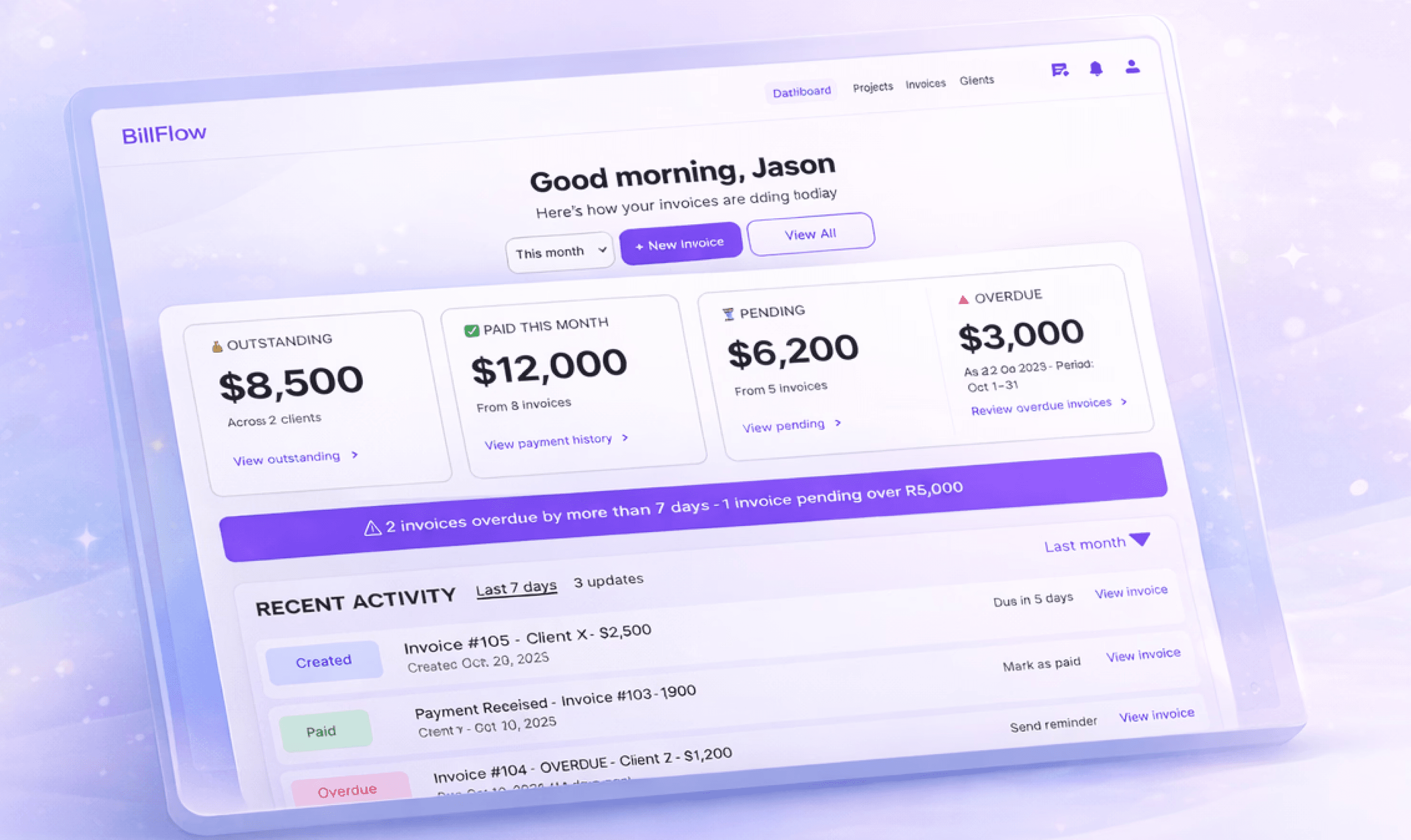
90%
Time Saved
18 hrs
Recovered Per Year
5→1
Tools Consolidated
The Problem
Freelancers waste 2-4 hours monthly on invoicing, causing payment delays and lost income
Freelancers struggle with fragmented invoicing workflows—switching between multiple tools to create, send, track, and follow up on invoices. This leads to delayed payments, missed follow-ups, and poor cash flow visibility.
"I spend 3 to 4 hours monthly creating invoice drafts. I have to make sure the contract is airtight—there's no way I will be losing out if a client backs out."
J
Jason
UX Designer, 7 years experience
2-4h
Monthly time
spent on invoicing
5+
Tools juggled by freelancers
$1.8K
Annual income lost to admin
0
Tools supporting milestones
🧮
Calculation Frustration
Manual math (hourly rate × hours + tax) leads to errors and looks unprofessional, especially with international clients requiring currency conversion.
"The calculation frustrates me, especially with international clients."
🔀
Tool Fragmentation
Juggling Word + Figma + Spreadsheets + Email + Calendar scatters data and wastes mental energy on context switching.
"What if there was just ONE tool for all this?"
📄
Multiple Invoices Per Project
Real projects need milestone payments (40% + 30% + 30%), but tools like Contra limit users to one invoice per project.
"Can't send more than one invoice per project. Makes it frustrating."
💱
Currency Barriers
USD-only tools exclude international freelancers and create friction with international clients who prefer their local currency.
"Easier for clients to pay in their currency—they are comfortable."
Research & Discovery
Understanding why invoicing is painful for creative freelancers
Research Methodology
5
User Interviews
1-20
Years Experience Range
30-45
Minutes Per Interview
Focus: Current invoicing workflows, pain points, tool frustrations, and payment tracking
needs

Key Findings
4/5 participants
1. Calculation Frustration
Freelancers manually calculate (Hourly rate × Hours worked) + Tax for every invoice,
leading to errors, wasted time, and unprofessional appearance.
Impact: 5+ minutes wasted per invoice, calculation errors damage credibility
4/5 participants
2. Tool Fragmentation
Average tools used: 5+ (Word, Figma, Spreadsheets, Email, Calendar). Context switching
wastes time and mental energy, with no single source of truth.
"Uses many tools, what if there was just ONE tool for all this?"
Impact: Data scattered across platforms, duplicate data entry, increased cognitive load
3. Multiple Invoices Per Project
⭐ Critical Competitive Gap
DIFFERENTIATOR
Real projects follow milestone structures (40% advance + 30% milestone + 30% final), but
competitor tools like Contra force workarounds by limiting to one invoice per project.
"In Contra, you can't send more than one invoice per project. If you want to change the invoice, you can't—you have to create a new project. Makes it frustrating."
J
Jason,UX Designer
Impact: This feature alone differentiates BillFlow from all competitors
2/5 participants
4. Multi-Currency Need
USD-only tools exclude international freelancers. Clients prefer paying in their local
currency for comfort and ease.
"It's easier for clients to pay in their currency than US dollar—then comfortable."
"It's easier for clients to pay in their currency than US dollar—then comfortable."
2/5 participants
5. Pricing Model Mismatch
Monthly subscriptions don't make sense for freelancers who only invoice 3-4 times per
year. Pay-per-use is more fair.
"Only invoice 3-4 times yearly, monthly payment not logical."
Impact: Lower barrier to entry, captures low-frequency users, reduces churn
Primary User Goal
This singular focus guided every design decision throughout the project.
The Solution
Design Goals
Primary Goal
Reduce invoice creation time by 90%
Multi-Currency
Enable international freelancing
Support Milestone Workflows
Multiple invoices per project
Reduce Anxiety
Clear visibility of payment status
User Flow
Dashboard
Create Invoice
Add Details
Review
Send
Track Payement
Constraints
Due to time constraints, I focused on the core invoicing flow and excluded advanced accounting features like tax reporting, expense tracking, or full project management.
This scoping decision allowed me to solve ONE problem exceptionally well rather than building a mediocre all-in-one solution.
The Solution in Action
A streamlined invoicing experience that reduces friction at every step

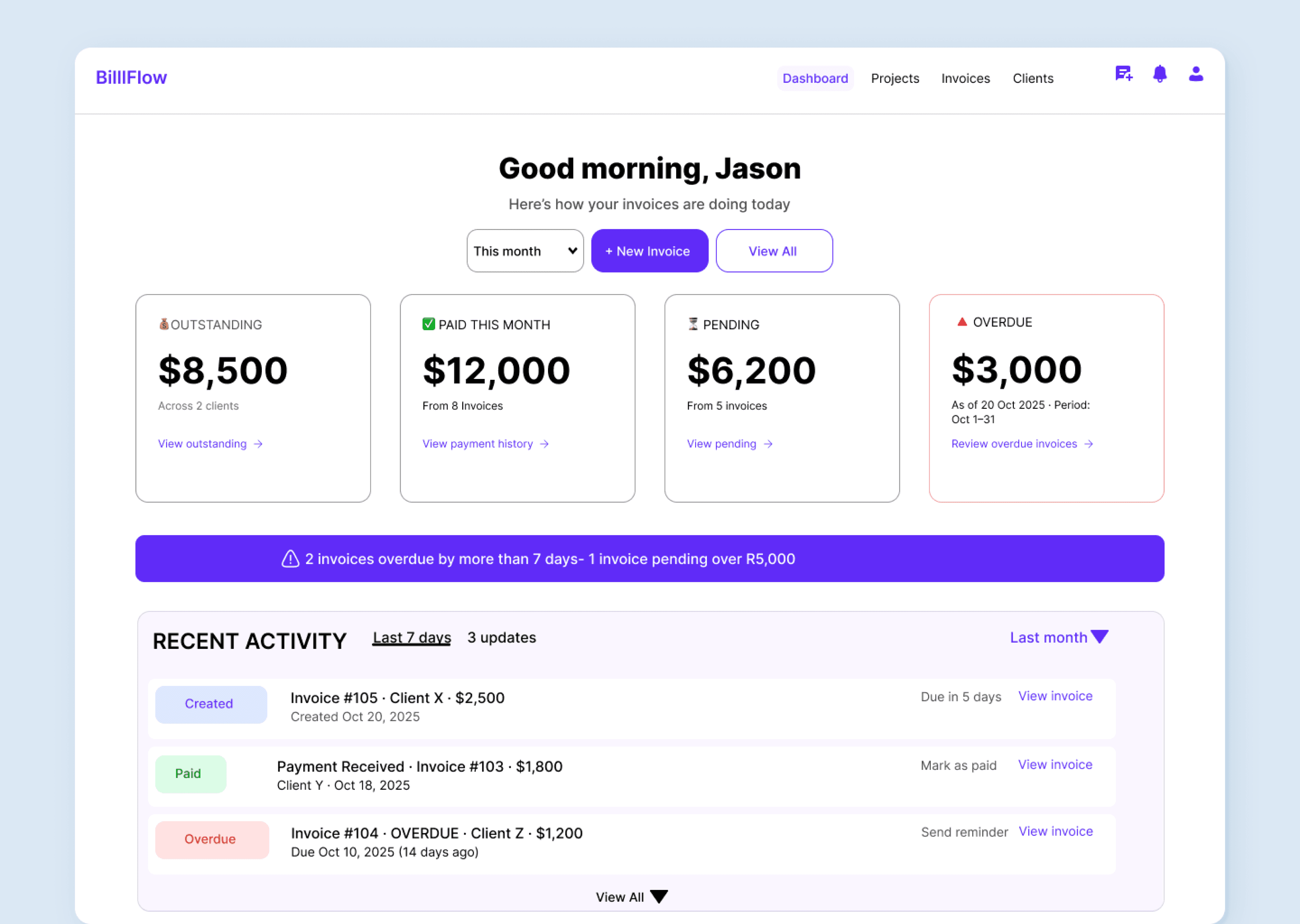
01 — Dashboard
At-a-glance payment visibility
Users understand invoice status in 3 seconds. Key metrics are prioritized with color-coded cards, and overdue invoices are visually stronger to drive immediate action.
Key UX Decisions
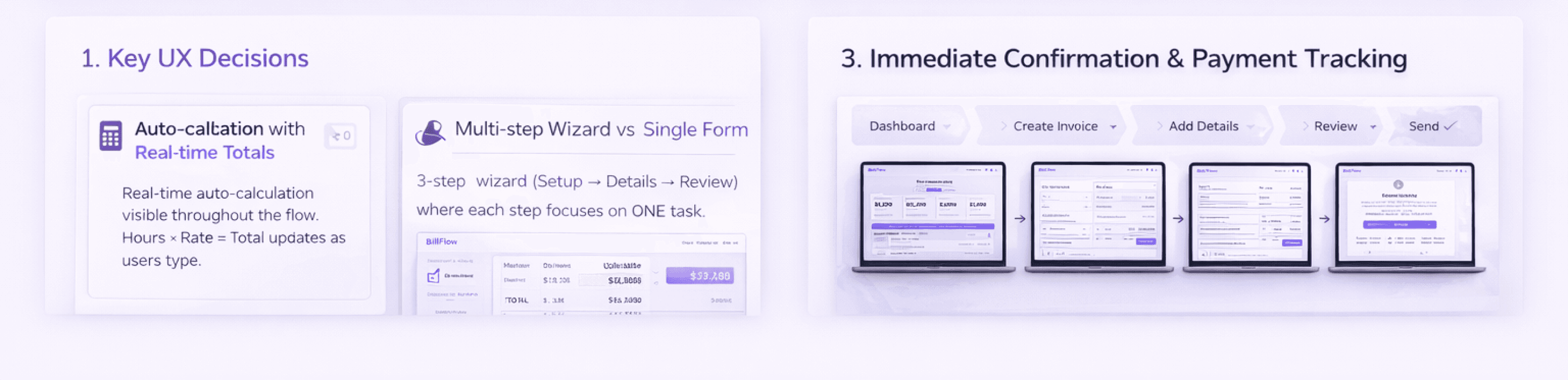
1. Auto-calculation with Real-time Totals
Problem: 4/5 users frustrated by manual math leading to errors
Decision: Real-time auto-calculation visible throughout the flow. Hours × Rate = Total updates as users type.
Why: Eliminates calculation errors, saves ~5 minutes per invoice, and creates a more professional output.
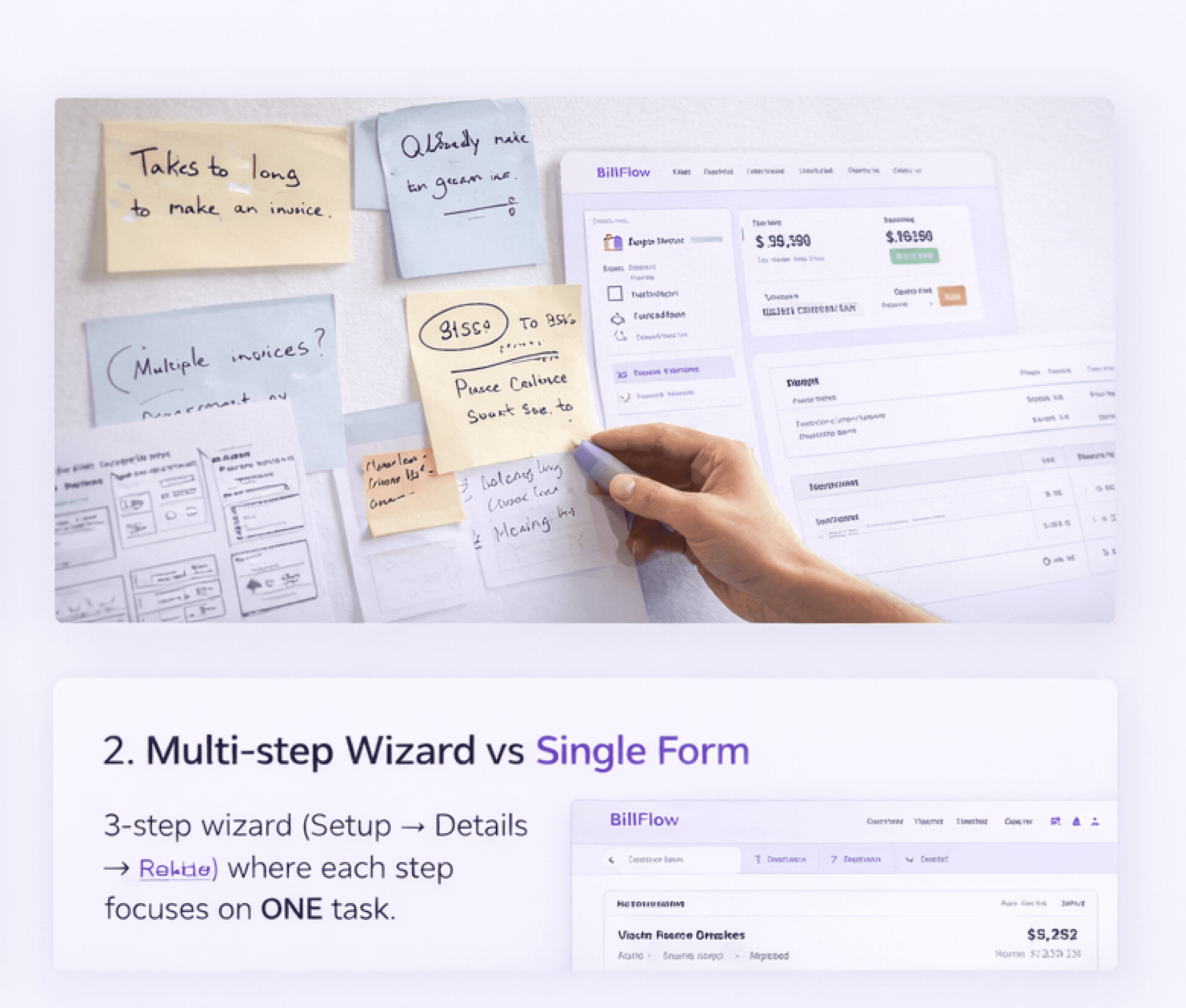
2. Multi-step Wizard vs Single Form
Problem: Long forms create cognitive overload and increase abandonment
Decision: 3-step wizard (Setup → Details → Review) where each step focuses on ONE task.
3. Multiple Invoices Per Project
Problem: Competitor tools (Contra) limit users to one invoice per project, forcing workarounds for milestone payments
Decision: Allow unlimited invoices per project with clear tracking of payment milestones.
Why: Real projects follow milestone structures (40% advance + 30% + 30% final). This feature alone differentiates BillFlow from competitors.
4. Review-Only Confirmation Screen
Problem: Users hesitate before sending invoices due to anxiety about errors or what happens next
Decision: Added a confirmation screen that explains what happens next and limits inline editing.
Why: Reduces anxiety, builds trust in the system, and prevents accidental changes during final review.
5. Tone Selector for Payment Reminders
Problem: Freelancers struggle with late payment communication and don't know what tone to use
Decision: Pre-written reminder templates with tone options (Friendly → Professional → Urgent).
Why: Reduces anxiety about "what to say", maintains professionalism, and adapts to different situations. No competitor offers this.
02 — Create Invoice (Step 1)
Flexible workflow for any scenario
Support both quick one-off invoices and milestone-based projects. Smart defaults reduce effort for repeat clients, while the stepped approach prevents cognitive overload.
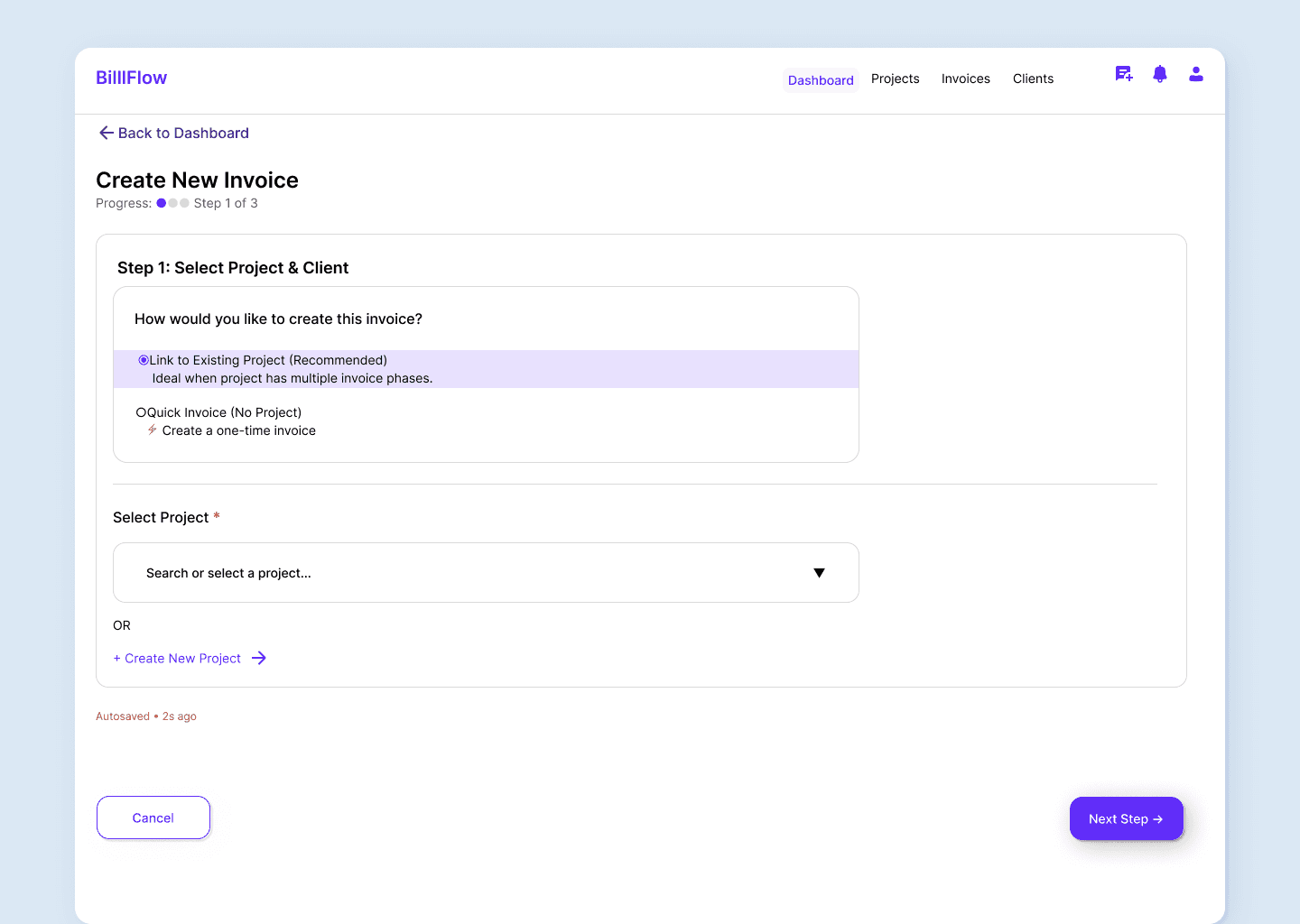
Design Decision:
Why 3 steps instead of a single form? Breaking the flow into focused stages reduces decision fatigue and creates a sense of progress—critical for users who "hate admin work."

03 — Create Invoice (Step 2)
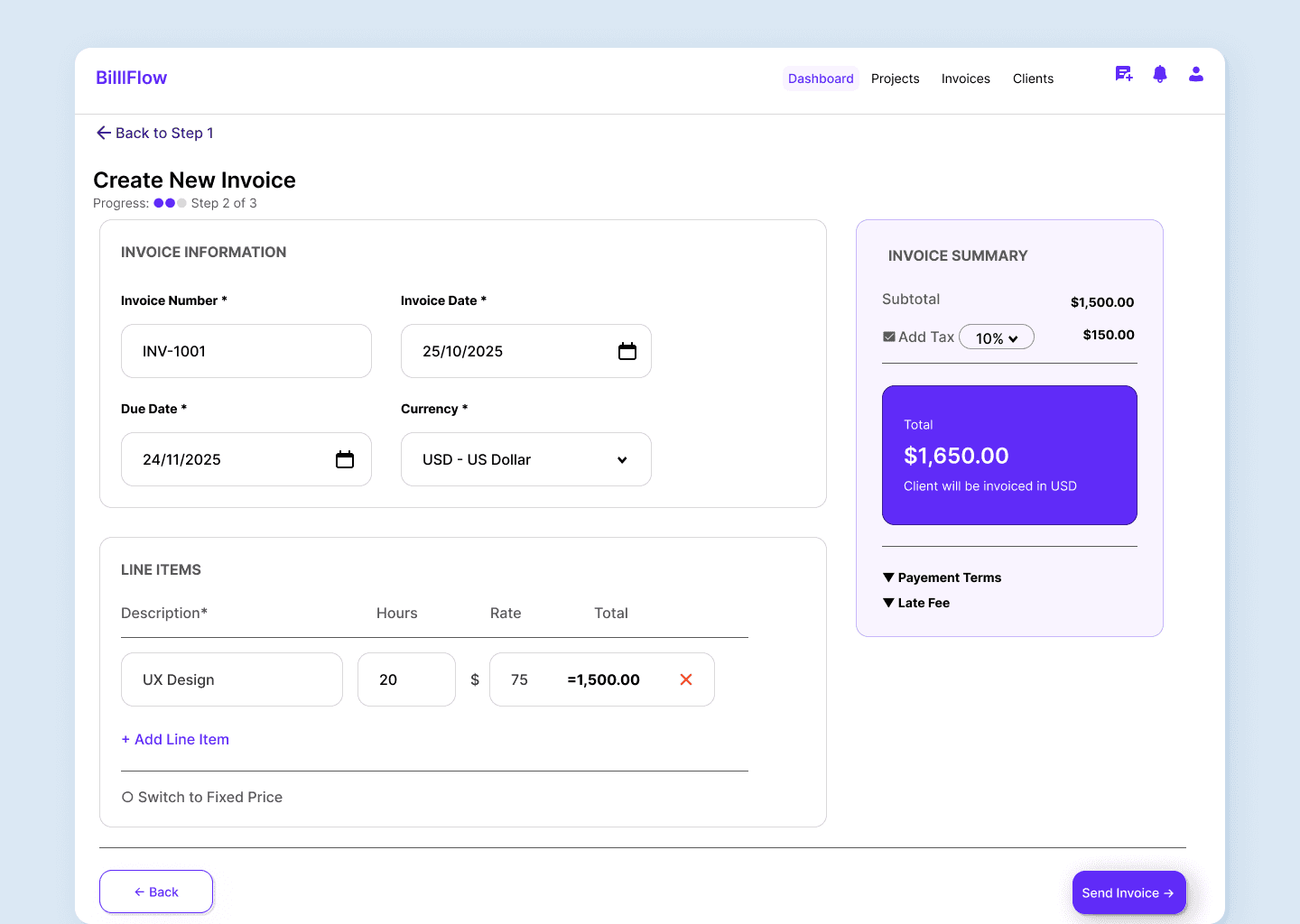
Real-time calculation eliminates errors
Line items calculate totals automatically as you type—no more manual math or spreadsheet errors. The running total stays visible, building confidence at every step.
🧮
Auto-calculation
Hours × Rate updates instantly, eliminating the #1 pain=-point from research
💱
Multi-currency
150+ currencies supported for international clients—a feature Contra doesn't offer
04 — Review & Send (Step 3)
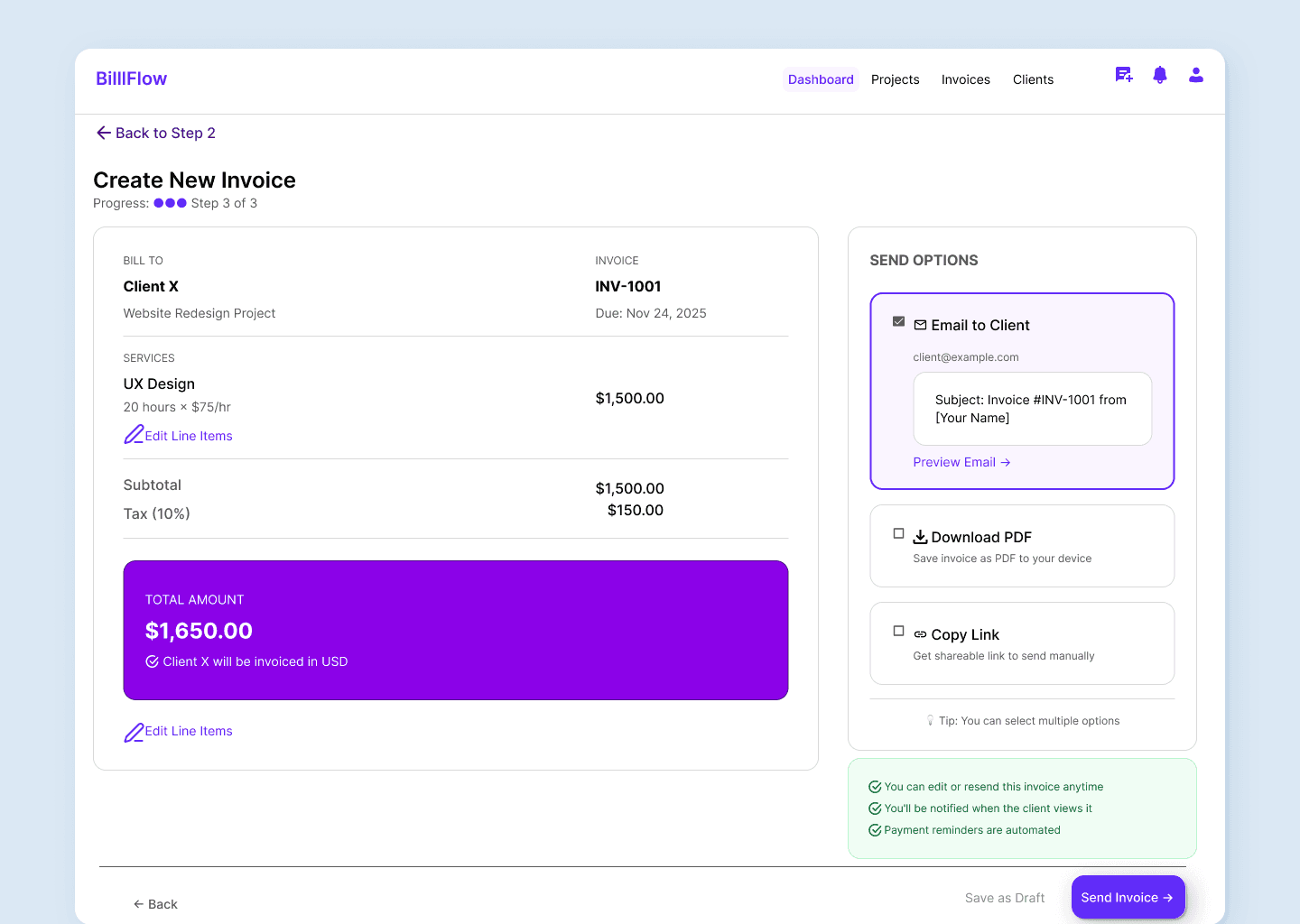
Review-only reduces anxiety
Final confirmation screen prevents accidental changes and clearly shows what the client will receive. Multiple send options provide flexibility while maintaining control.
05 — Confirmation
Clear next steps reduce post-action anxiety
After sending, users see exactly what happened and what to do next. Multiple exit paths allow seamless continuation of workflow without dead ends..
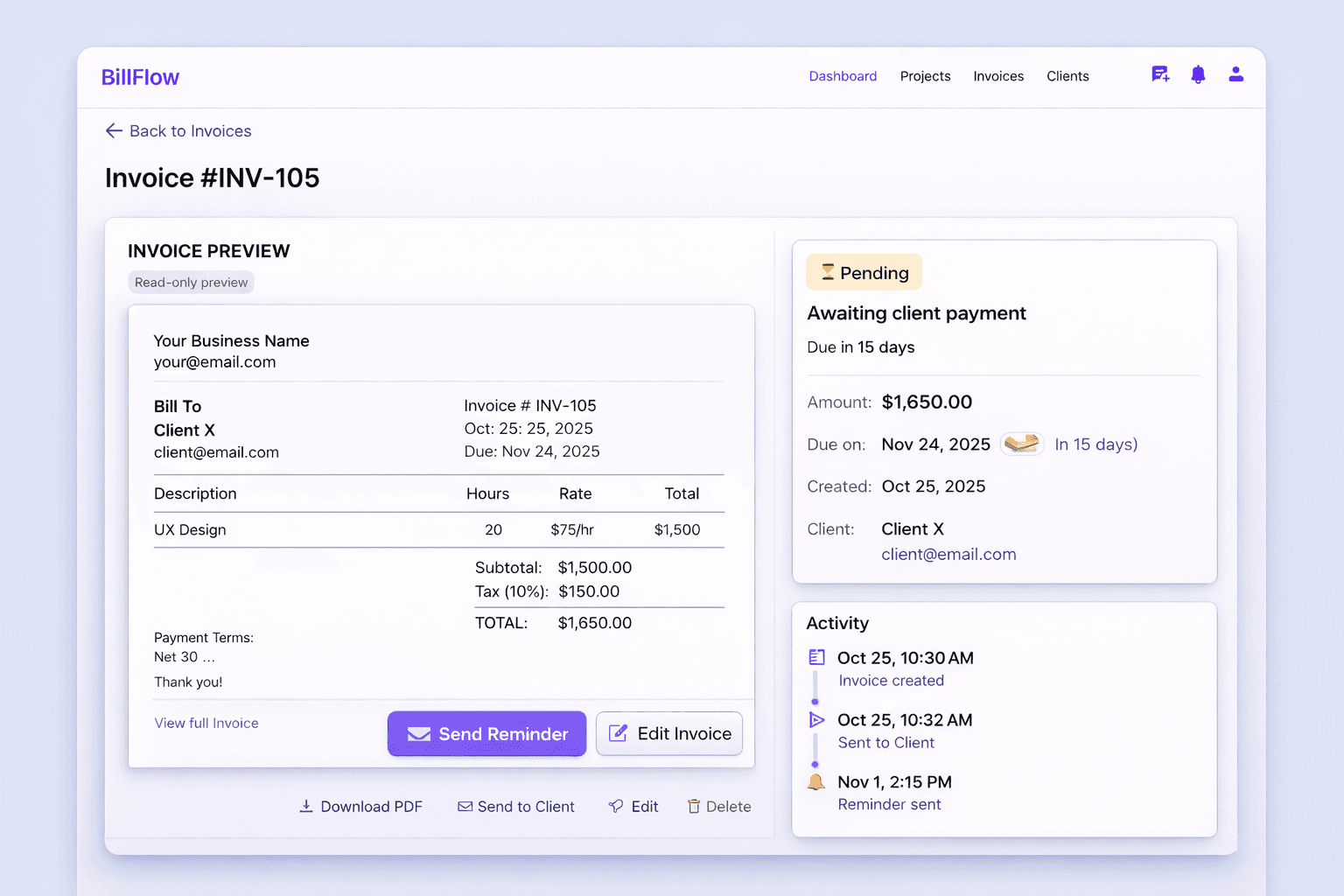
06 — Managing invoices after sending
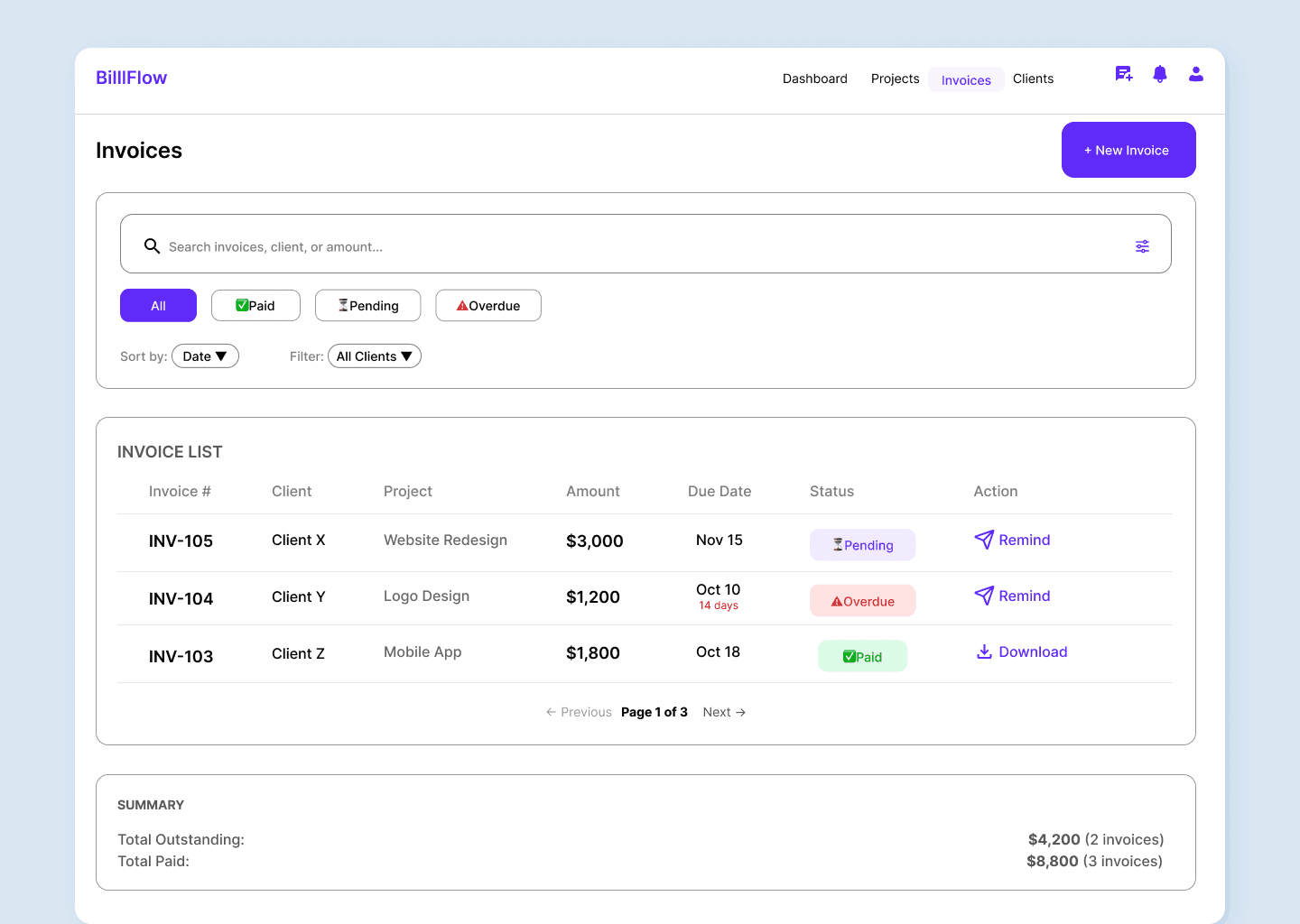
Track, filter, and follow up efficiently
Invoice list, detail view, and payment status screens consolidate everything into one
place—eliminating the need for 5+ tools.
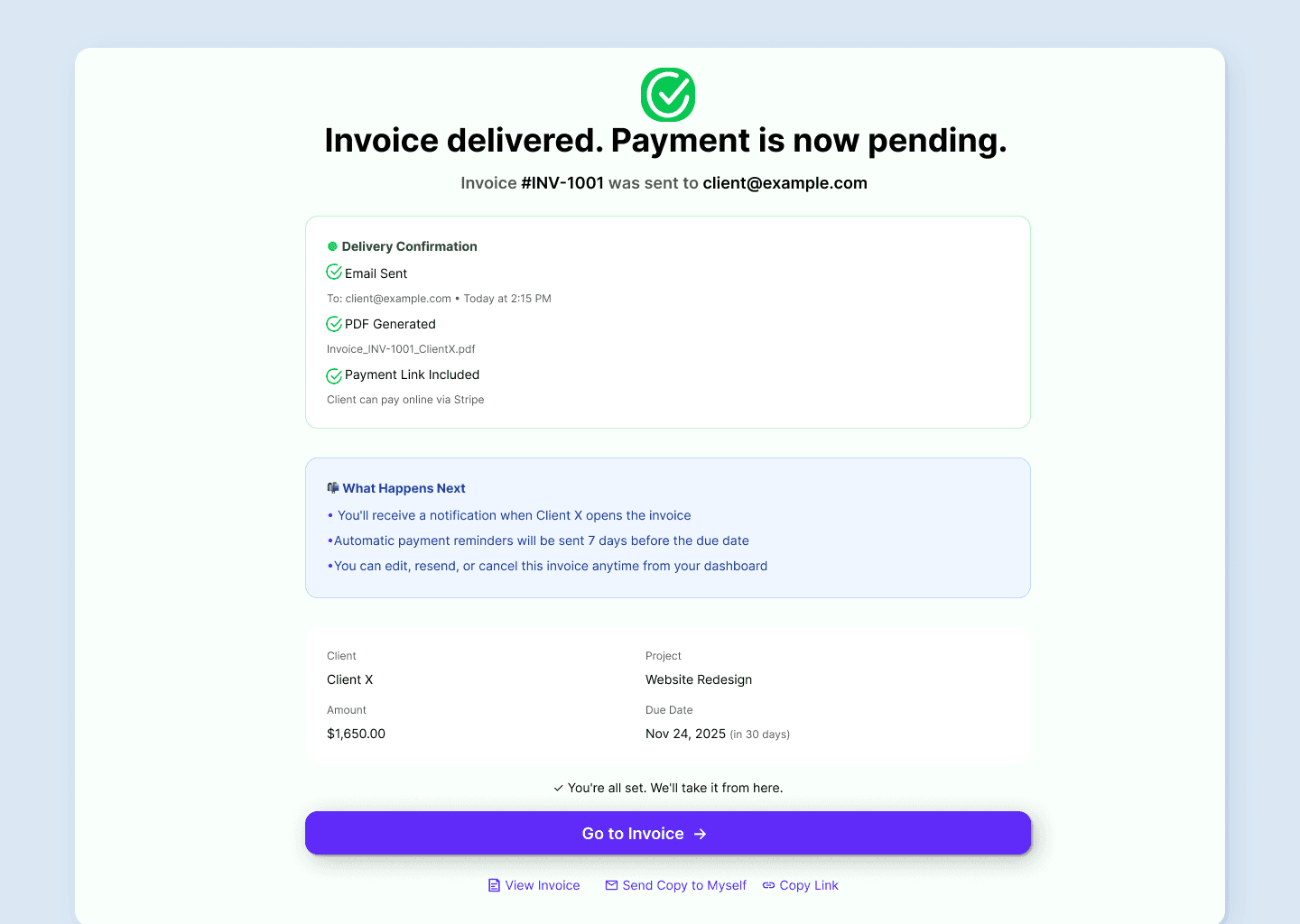
Why this matters:
Junior designers often forget success states. This screen prevents user confusion and builds trust that the system worked correctly—essential for "anxious" admin tasks.
🎯
The Killer Feature
BillFlow supports unlimited invoices per project—solving the #1 pain point from
research that no competitor addresses.
Example: Website Redesign Project
• Invoice #1: Research Phase (40% — $4,000) • Paid
• Invoice #2: Wireframes (30% — $3,000) • Pending
• Invoice #3: Final Design (30% — $3,000) • Draft
Impact & Outcomes
Quantifying the value of ruthless simplicity
BillFlow is designed to reduce invoice creation time by 90% and
recover hundreds of hours annually for freelancers—while addressing
critical gaps competitors missed.
90%
Faster invoice creation
From 20 minutes to under 2 minutes per invoice
$1.3K
Annual value recovered
Based on $75/hour billing rate (conservative)
18 hrs
Saved per year
Time recovered for billable client work
5→1
Tools consolidated
Eliminating context-switching and fragmentation
Competitive Moat
📄
Multiple Invoices
Per project — solves Jason's #1 frustration. No competitor offers this.
💬
Tone-Based Reminders
💳
Pay-Per-Use Pricing
Fair for low-frequency users who invoice 3-4 times yearly.
User Impact
✓
Reduced effort & time
90% faster invoice creation
✓
Improved clarity
Clear visibility of income trends
✓
Less stress & anxiety
Tone-based reminders and clear status
✓
Greater financial control
Consolidated payment tracking
Business Impact
✓
Higher retention potential
Solves pain no one else addresses
✓
Global market opportunity
Multi-currency enables international users
✓
Lower acquisition cost
Free/pay-per-use reduces barrier
✓
Credibility positioning
"Built by freelancers, for freelancers"
Reflection & Next Steps
What I learned and where this goes next
✓ What Worked Well
• User research uncovered a critical gap(multi-invoice per project) that competitors completely missed
• Focusing on ONE problem (invoicing) instead of trying to build full accounting software allowed for deeper solution
• Jason's detailed interview provided a gold mine of insights that shaped unique features (tone selector, currency needs, pricing model)
• Systematic approach to design decisions kept the project focused and prevented feature creep
→ What I'd Do Differently
• Conduct 10-15 interviews instead of 5 to validate pricing model assumptions and uncover more edge cases
• Test prototypes with users mid-design to catch usability issues earlier instead of waiting until final designs
• Create design system components first, then screens—would have saved significant iteration time and ensured consistency
• Design more empty states and error handling upfront rather than adding them late in the process
Roadmap to Launch
1
Validation Phase
• Usability testing with 8-10 freelancers to validate core flows
• Test reminder timing and confirmation copy effectiveness
• Measure invoice completion rates and identify drop-off points
• Build clickable prototype for developer handoff
2
MVP Launch & Expansion
• Contract templates for legal protection (addresses research pain point)
• Recurring invoices for monthly retainers
• Client portal for transparent payment view
• Analytics dashboard for income tracking and patterns
3